
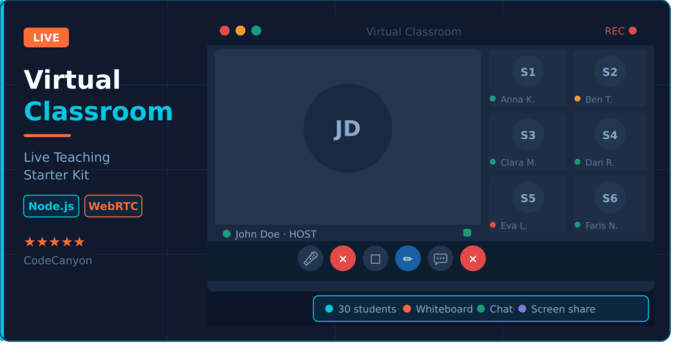
Virtual Classroom — Live Teaching Starter Kit
A focused, browser-based virtual classroom built for one specific scenario: a
teacher running a live lesson for up to 30 students. No accounts, no downloads,
no plugins — the teacher clicks "Start Lesson" copies an invitation link, and
the class begins.
Unlike general-purpose video-conferencing scripts, this starter kit is
purpose-built for education: a strict host/student model, a mandatory
waiting room, teacher-only whiteboard authorship, and explicit controls for
raised hands and individual student unmuting. Every flow — from the pre-join
screen to disconnect recovery — is specified in production-grade detail.
Who is this for:
Primary audience — developers and development teams building:
- - Online tutoring and coaching platforms
- - K-12 and university e-learning products
- - Corporate training tools
- - Language schools and private-lesson marketplaces
- - Any product that needs a live classroom module without the bloat of a full
- conferencing suite
Not for: organizations that need user accounts, recordings, breakout
rooms, or more than 30 simultaneous students. This is a deliberately minimal,
well-specified foundation — you extend it with the features your market needs.
Why a "Starter Kit"?
Because this is a clean, extensible base, not a SaaS-ready behemoth.
You get:
- A complete PRD (90+ pages, 60+ functional requirements, every edge case
- specified: permission denials, network drops, session-full, waiting-room flows, reconnection windows, input validation, empty states)
- Production-ready code covering every acceptance criterion in the PRD
- Zero vendor lock-in on the real-time transport layer — swap the signalling/media layer without touching product logic
- A fork-friendly structure so you can add recording, scheduling, breakout rooms, or LMS integration in your own implementation
Core Feature Set:
Session Management
- - Instant-start sessions (no scheduling, no accounts)
- - Cryptographically unguessable session IDs (128-bit entropy)
- - Separate host URL and student invitation URL
- - Optional session name (1–100 characters)
- - Hard participant cap with graceful "session full" message (31st visitor)
- - Session-ended and link-expired states for all participants
Pre-Join Screen (teacher & student)
- - Display name input with live validation (1–50 chars)
- - Live camera self-preview
- - Camera / microphone toggles with permission-denied fallbacks
- - Initials avatar when camera is off or denied
- - Graceful degradation: join without camera, without mic, or both
Waiting Room
- - Every student must be explicitly admitted by the teacher
- - Stacked notifications in arrival order
- - Admit / Decline actions with inline feedback to the student
- - Declined students see Try Again / Leave options
Live Classroom Layout
- - Dominant teacher tile (≥60% of main content area)
- - Horizontally scrollable student thumbnail strip
- - Tile order fixed by admission order
- - Green glow speaking indicator (active-audio detection)
- - Muted-mic icon overlay on every muted tile
- - Initials fallback on any tile with camera off
Audio & Video Controls
- - Teacher: mute/unmute own mic, camera on/off
- - Students: camera on/off, self-mute when unmuted by the teacher
- - Teacher mute/unmute of any individual student
- - Students are muted by default on entry
Participant Management (teacher-only)
- - Participant panel with full admitted list
- - Raise hand (student) with queue-ordered raised-hand list for the teacher
- - Call on student (unmute + promote to speaker)
- - Lower hand without unmuting
- - Remove student from the session (per-session block, no rejoin)
Whiteboard (teacher-only authorship)
- - Tools: Pen, Pencil, Text, Rectangle, Circle, Line, Arrow
- - Color palette, thickness, font size
- - Undo / Redo / Clear
- - Students see the whiteboard in real time but cannot edit
- - Mutually exclusive with screen share
Screen Sharing
- - Full screen, application window, or browser tab (browser-native picker)
- - Mutually exclusive with whiteboard
- - Stop button returns to default video layout
Chat
- - Plain-text chat for all participants (up to 500 chars/message)
- - Collapsible side panel
- - Unread-message badge
- - No attachments, no Markdown rendering, no file uploads (by design)
Session Lifecycle
- - Teacher ends session with confirmation dialog
- - 60-second reconnection window for teacher disconnection
- - 30-second reconnection window for student disconnection
- - User-facing countdown messages during reconnection
- - Session-ended screen for every participant, every path
Input Validation & Empty States
- - Every input bounded (display name 1–50, session name 0–100, chat 1–500)
- - Specific human-readable error for every failure path
- - No generic "Something went wrong" messages anywhere
- - Empty-state messages for student strip, participant panel, chat, and
waiting-room queue
Accessibility & Responsive Layout
- - WCAG 2.1 AA compliance
- - Keyboard navigation for every primary control
- - Color + icon shape for all state indicators (not color-only)
- - All UI strings externalized — ready for i18n
- - Desktop (1024+) and tablet (768–1023) for teacher UI
- - Mobile support (320–767) for student UI
- - Supported browsers: Chrome 90+, Firefox 90+, Safari 14+, Edge 90+
What's Included in the Package
- - Full source code (frontend + signalling/transport layer)
- - Complete PRD document (the same 90-page specification the product was built from)
- - Setup and installation guide
- - Deployment guide for Node.js and Docker
- - Browser compatibility reference
- - Extension guide (how to add recording, scheduling, breakout rooms, LMS integration)
- - Six months of free updates
What's Deliberately Out of Scope
- - Session recording (storage, consent, and legal complexity — your call)
- - Lesson scheduling / teacher dashboard (instant-start covers the core case)
- - User accounts and authentication
- - Breakout rooms
- - Student whiteboard editing
- - File attachments in chat
- - More than 30 students per session
Every one of these is a documented extension point. The PRD marks them explicitly as "Future / Backlog" so you know exactly where to plug your own implementation.
Why Buy This Instead of Building From Scratch
Building a production-grade live classroom from zero takes 8–12 weeks of engineering time just to cover the edge cases (permission handling, reconnection, waiting-room race conditions, speaking detection, mobile layout, etc.). This starter kit delivers all of that, fully specified and implemented, so your team focuses on your differentiator — not on re-solving video layout and audio toggles.
Support & Updates
Six months of free updates and standard item support included. Full documentation hosted publicly. Please use the item's comment/support system for any questions.
$49
This item was featured on CodeGrape


| Created | 28 Apr 2026 |
| Compatible Browsers | Firefox, Chrome, Safari, Opera |
| Package Includes | JavaScript JS, JavaScript JSON, HTML, CSS |
| File Size | 348 KB |
Report This File
