
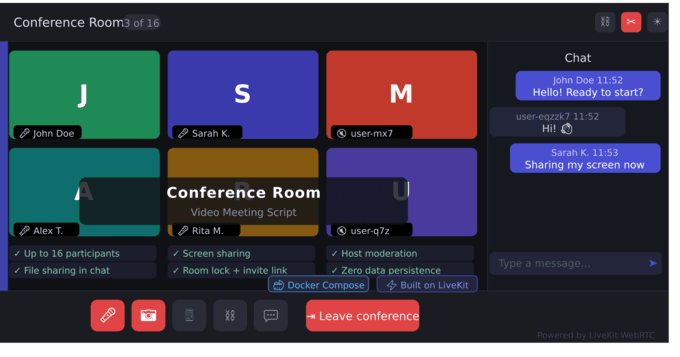
The modern video conference script — beautiful, self-hosted, zero setup friction.
Conference Room is a self-hosted web application that lets anyone create an ad-hoc video conference room for up to 16 participants, invite others via a shareable link, and collaborate through video, audio, text chat with file attachments, and screen sharing.
Built on LiveKit — the same open-source WebRTC infrastructure powering companies like Reddit and Spatial. No other CodeCanyon script uses LiveKit, giving you a production-grade, battle-tested media layer maintained by a funded team with excellent documentation.
Why Conference Room?
- One-command install. Run
docker compose up -dand you're live. No database, no PHP, no migrations, no external API keys. - Dark-first premium design. Ships production-ready out of the box — no redesign needed. Light theme included and toggleable.
- Fully rebrandable in 5 minutes. Edit a single
config/branding.jsonfile to change product name, logo, colors, and footer text. No React code changes required. - Ephemeral & privacy-first. Zero data persistence. No user accounts, no tracking, no stored meetings. When the last participant leaves, the room is gone. Perfect for telemedicine, legal consultations, and privacy-sensitive use cases.
- Mobile responsive. Works on iOS Safari 15+ and Android Chrome 100+. Adaptive grid layout from 320px to 2560px viewports.
Perfect for
- Telemedicine and telehealth portals
- Online tutoring and education platforms
- Legal and financial consultation apps
- Small-team internal communication tools
- Startup MVPs with embedded video calls
- Any vertical product that needs self-hosted video meetings without per-minute API fees
How it works
- A user enters a room name on the landing page and clicks "Start Conference"
- On the pre-join screen, they set their display name, preview their camera, and select devices
- They join the room and share the invite link — anyone with the link can join instantly
- The first participant becomes the host with moderation controls
- When everyone leaves, the room is automatically destroyed
Host moderation controls
- Remove participants from the meeting
- Force-mute a participant's microphone
- Force-disable a participant's camera
- Lock the room to prevent new joiners
- End the meeting for all participants
- Automatic host transfer when the host disconnects
Architecture
Three-service Docker Compose stack:
- React SPA frontend — Vite + TypeScript + LiveKit Components React
- Node.js backend — Express + Socket.io + LiveKit Server SDK
- LiveKit Server — Apache 2.0 licensed SFU with built-in TURN
No database. No external dependencies. No recurring API costs. Everything runs on your VPS.
Theming
All colors are defined as CSS custom properties. Two built-in themes (dark default + light) toggleable by users. Full rebranding via a single JSON config file with documented fields for: product name, logo path, primary color, accent color, background color, footer text, and footer link URL.
Security
- HTTPS required in production
- DTLS-SRTP encrypted media (built into LiveKit)
- Server-side participant cap enforcement
- XSS protection on all user input
- MIME-type whitelist for file uploads (content-sniffing, not header trust)
- Rate-limited room creation (10 rooms/min per IP)
- Time-limited LiveKit access tokens (1-hour TTL)
What's NOT included (by design)
We deliberately chose focus over feature count. The following are intentionally excluded to keep the product clean, maintainable, and fast:
- Recording (planned for v1.1)
- Whiteboard
- AI/ChatGPT integration
- Admin dashboard
- SaaS billing
- User accounts or registration
Why 16 participants?
16 is a UI quality ceiling, not a technical limit. The grid layout stays beautiful and usable at 16 tiles. The underlying LiveKit architecture supports more — if you need higher limits, change a single constant in the configuration.
$39


| Created | 28 Apr 2026 |
| Compatible Browsers | Firefox, Chrome, Safari, Opera |
| Package Includes | JavaScript JS, JavaScript JSON, HTML, CSS |
| File Size | 242 KB |
Report This File
