
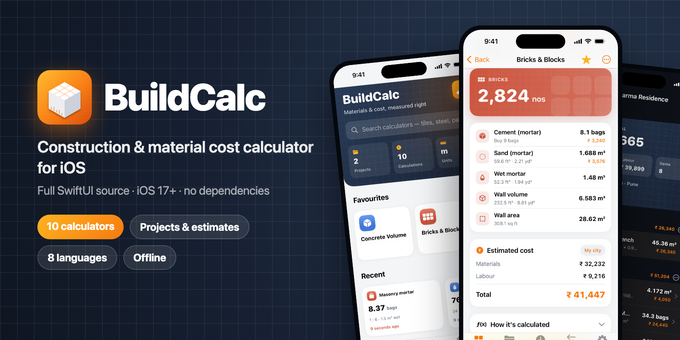
BuildCalc is a ready-to-publish iOS app for builders, contractors, engineers and homeowners. Enter dimensions and get material quantities and cost straight away, with a labelled diagram and the step-by-step working behind every number. Pure SwiftUI, fully offline, no dependencies.
10 calculators
- Concrete volume: slab, isolated / combined / stepped footing, rectangular and round column, beam, wall, staircase. Number of members, wastage, ready-mix or site-mixed.
- Mix design: M10, M15, M20, M25 or custom ratio. Cement bags, sand, aggregate, water.
- Water–cement ratio: from cement bags or concrete volume, with exposure guidance.
- Steel / rebar: weight by diameter (6–32 mm, D²/162), several bar sizes, kg and tonnes.
- Bricks & blocks: modular, traditional, AAC, concrete block or custom size. Door and window deductions, mortar cement and sand.
- Mortar: 1:3 to 1:8.
- Plaster: internal, external or ceiling. 6–20 mm, openings deducted.
- Flooring & tiles: tiles and boxes, skirting, adhesive bags, grout.
- Paint: whole room or single wall, ceiling, coats, primer, putty, and which tin sizes to buy.
- Excavation: trench, pit or plot. Cut with soil swell or fill with compaction, plus truck loads.
Cost estimating
- Editable rate list per city for materials and labour
- Prices in site units: per bag, cft, brass, kg, tonne, sq ft, 1,000 bricks…
- Cost on every result, room and project totals
- 21 currencies
Projects & sharing
- Group calculations by project and room
- Reopen any item, change it and update it in place
- Share an estimate as text (WhatsApp, email…)
- Every calculation is saved automatically in a searchable history
Built for real sites
- Metric or imperial everywhere. Type 10 6, 10' 6", 10 ft 6 in or 250mm
- Unit converter: length, area (incl. gaj, acre), volume (incl. brass), weight, density
- Wastage advisor with recommended defaults
- 8 languages: English, Hindi, Marathi, Gujarati, Tamil, Telugu, Kannada, Bengali
- Dark mode, Dynamic Type, iPhone and iPad
- Works fully offline. No account, no server, no tracking
For developers
- 100% Swift and SwiftUI, no third-party libraries
- Clean structure: a pure-Swift calculation engine separate from the UI
- Engine tests included (Tests/run-engine-tests.sh)
- Saved data survives app updates; unreadable data is backed up, not lost
- Rebrand from one config file. Guide included for adding new calculators
- Branded launch screen: swap one logo and one colour in the asset catalog, no code
- Debug launch options to produce App Store screenshots with sample data
- "Data Not Collected" privacy label; export compliance pre-set
Requirements
- Xcode 26 or later
- iOS 17.0 or later
- An Apple Developer account to publish
What's included
- Full Xcode project source
- Engine tests and a run script
- HTML documentation: install, rebrand, configure rates and currencies, add languages, add a calculator, publish to the App Store
- 1024 × 1024 app icon
Not included
PDF quotations, Excel/CSV export, bar bending schedule, roofing, iCloud sync, widgets, in-app purchases or ads.
Note for buyers
Results are estimates based on standard thumb rules (IS-code site practice). Quantities should be confirmed by a qualified engineer.
Support: eeshu161286@gmail.com
$29


0
Comments
| Created | 25 Oct 2026 |
| Package Includes | N/A |
| File Size | 897 KB |
© All Rights Reserved Dheerendra161286
Report This File
Report This File


