
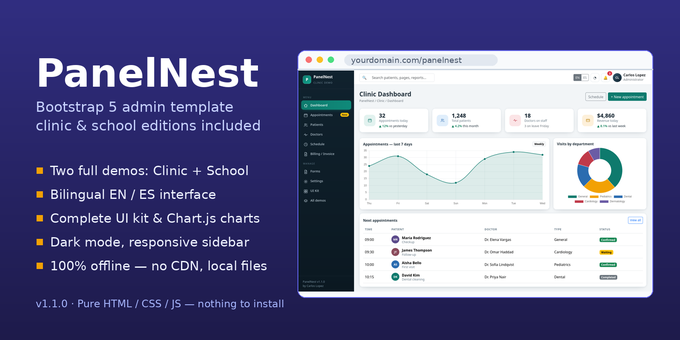
PanelNest — Bootstrap 5 Admin Template (Clinic & School, Bilingual EN/ES)
PanelNest is a complete Bootstrap 5 admin dashboard template that ships with two ready-made vertical editions — a clinic and a school — sharing one clean, original design system. Everything is local: Bootstrap 5 and Chart.js are included in the download, so the template works 100% offline, with no CDN and nothing to install. Unzip it, open index.html, and start building.
Each vertical is a full demo with realistic sample data, its own dashboard with charts, data tables with live search, sorting and pagination, forms, settings and a printable document (clinic invoice / school fee receipt). A shared UI Kit page shows every component in one place, and dark mode is built in with a topbar toggle that remembers the visitor's choice.
Fully bilingual (v1.1.0). The entire interface is available in English and Spanish: a visible EN | ES switcher sits on every page, the chosen language is remembered across pages, and the Chart.js charts relabel instantly when you switch. All 481 translation keys per language live in one file (assets/js/i18n.js), so rewording a text — or adding a third language — takes minutes.
FEATURES:
• Fully bilingual interface (English / Spanish) — visible EN | ES switcher on every page (landing, both verticals, UI Kit, login and register), next to the dark-mode toggle
• 481 translation keys per language, all centralised in assets/js/i18n.js — edit any wording in one place, or add a third language by adding one dictionary
• Language choice is remembered across pages (localStorage) and applied automatically on every page load
• Charts relabel instantly when the language changes — Chart.js labels and datasets re-render live, no reload needed
• Dark mode with topbar toggle, persisted across pages (localStorage)
• Two complete vertical demos — Clinic (9 pages) and School (9 pages) on one design system
• Clinic pages: dashboard, appointments, patients, patient profile, doctors, weekly schedule, printable invoice, forms, settings
• School pages: dashboard, students, interactive attendance marking (P/A/L), fees & payments, teachers, timetable, printable receipt, forms, settings
• UI Kit page: buttons, badges, alerts, progress, cards, tables, form elements, working modal, tabs, pagination, typography and a Chart.js trio
• Chart.js charts (line, bar, doughnut) initialised from simple data-* attributes
• Responsive collapsible sidebar + topbar with search field, notifications and user dropdowns
• Demo-table helpers in vanilla JS: live search, click-to-sort columns, simple pager
• Print styles: invoice and receipt print as clean sheets
• Hand-written CSS design system — rebrand in minutes by editing the :root color variables
• Bootstrap 5.3 and Chart.js 4 included locally with their MIT licenses — no CDN, works fully offline
• Login and register pages included
• Full documentation included inside the download
REQUIREMENTS:
• A modern web browser (Chrome, Firefox, Edge or Safari)
• Any static hosting or web server — or simply open the files locally. No PHP, no database, no server-side runtime and no build step required.
INSTALLATION:
1. Unzip the download and upload the files to your static hosting or web server (or keep them locally and open them from disk).
2. Open index.html in the browser and pick a demo: Clinic, School or the UI Kit.
3. Customise the branding by editing the :root color variables in assets/css/app.css.
4. Customise the languages in assets/js/i18n.js: every interface text lives there as a key in the English and Spanish dictionaries. The included documentation explains how to edit a wording, change the default language and add a third language.
5. Full step-by-step documentation is included inside the download (documentation/index.html).
LIVE DEMO:
No demo login is needed — PanelNest is a static template, so every page is directly browsable: open index.html, enter the Clinic or School demo, and use the EN | ES switcher in the topbar to see the whole interface (charts included) change language. Try the attendance page (click P/A/L to change a student's status), toggle dark mode from the topbar, and search or sort any main table.
SUPPORT:
Support is provided through the author's CodeGrape profile (carloslopezrd): ask a question or open a support request from the item page and you will get help with setup and customization. The download also includes step-by-step documentation covering the file structure, color/branding customization, the language system and the JavaScript helpers.
$29

| Created | 25 Oct 2026 |
| Compatible Browsers | Firefox, Chrome, Safari, Opera, Edge |
| Columns | 1 |
| Layout | Responsive |
| Package Includes | HTML Files, CSS Files, JS Files |
| File Size | 214 KB |
Report This File
